Blogs
Microsoft Fabric: Expert Guidance for a Successful Evaluation
Use a secure hub-spoke network architecture and Azure Policies to enforce the use of Private Endpoints in a hub’s centralized, private DNS zone.
Security is a leading concern as enterprises adopt hybrid cloud strategies and a challenging one at that. At SNP Technologies, we have hybrid security solutions to meet the stringent security requirements of our customers.
In this article, we highlight the scenario wherein the organization has adopted Azure managed resources, such as Azure SQL Database and Azure App Service, in their hybrid cloud solution architecture. These so-called “platform-as-a-services” resources (or PaaS for short) are exposed to the public internet by default.
Hence, the challenge is how to reign in the PaaS resources, so their traffic only flows over the organization’s private network. The solution entails the integration of DNS zones with private endpoints and the use of government policies to enforce the security configuration for each PaaS resource added to the network.
First, we discuss a recommended network architecture to fulfill this requirement. Then we provide examples of governance policies designed by SNP that enforce secure practices for private IP range integration and name resolution. These methods solve many hybrid cloud solution architecture concerns, like:
Figure 1 illustrates the architecture designed by SNP engineers to secure a hybrid cloud having PaaS resources. This example has an Azure SQL database and the architecture features:
Figure 1
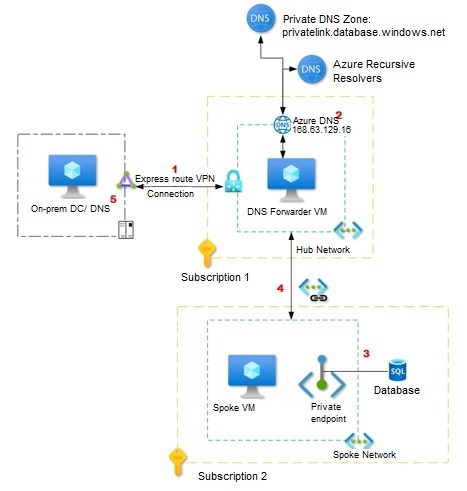
A ensure private networking for PaaS resources, the following conditions should be met:
Below we describe three policies that work together to ensure these conditions are met.
Please note that the policies are customized and not built-in Azure policies (e.g. Azure Policy samples). In the list of resources provided at the end of this article is a link to a tutorial on how to create a custom policy definition in Azure.
Why: As described above, since the “Integrate with DNS private zone?” setting is set to “No”, a DNS zone for the Private Link is not created. Therefore, we need to have a method to integrate the Private Link with the centralized DNS zone of the hub. Out of the box, Azure does not provide this option during resource creation.
How: We use a Remediation policy to automate the DNS entry. Within Azure, resources that are non-compliant to a deployIfNotExists policy can be put into a compliant state through Remediation.
The Azure portal screen captures below depict the policy remediation plan:
1. In Figure 8 we see the policy to remediate. The Remediation task is to automatically add the Azure Resource DNS record to the central private DNS zone.
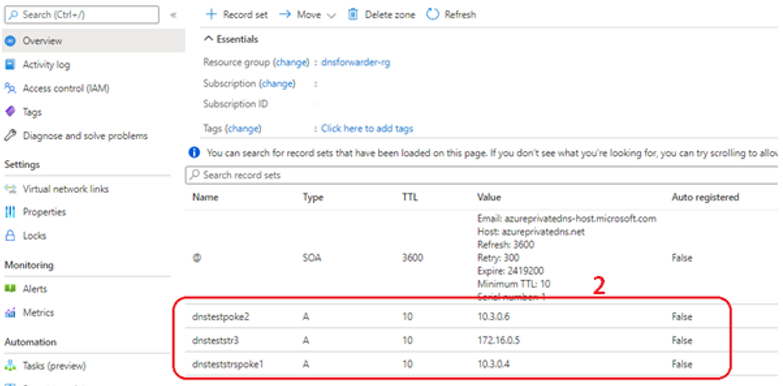
2. Figure 9 shows that the remediation policy successfully added the DNS entries on the private DNS zone for the respective Private Link DNS records.
Figure 8
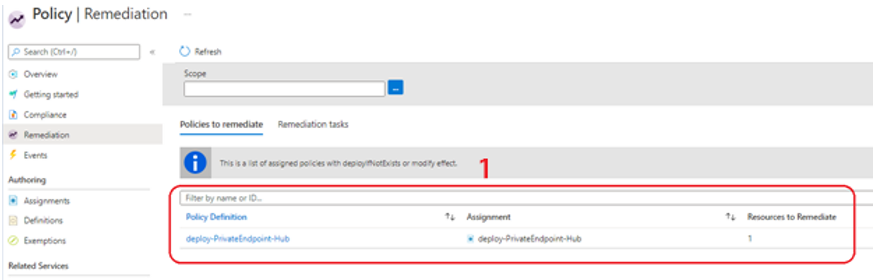
Figure 9
In this article we have shown how one can securely deploy Azure PaaS resources with private endpoints. While thoughtful hybrid network planning is a given, Azure governance is an ingredient for success that is often overlooked. We hope you explore the resources provided below to learn more about Azure Private Link, how DNS in Azure is managed and how Azure Policy can automate the governance of resource creation once the network and security foundation is in place. Contact SNP Technologies Here.
Why: Access to endpoints are by default accessible over the public internet.
How: This policy prevents users from creating Azure PaaS services with public endpoints and invokes an error if the private endpoint is not configured at resource creation.
Note: In Azure, the resource that enables the private endpoint is Azure Private Link. Please refer to the Resources section at the end of this article for links to related Azure documentation.
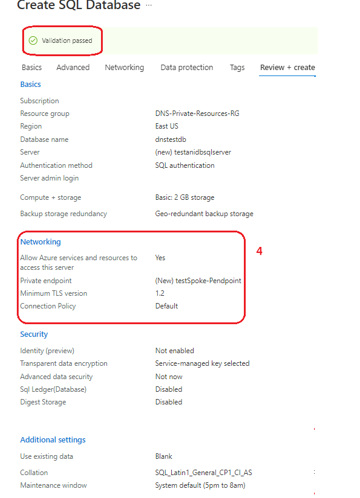
Figure 2 depicts the Azure Portal screen when the policy criteria is not met:
1. Validation fails because of the governance policy
2. Error Details indicate the Azure Policy that disallows the Public Endpoint creation
3. In the Networking section we see that “Private endpoint” setting is set to “None”
4. Once the Private endpoint is added, the policy validation passes (Figure 3)
Figure 2
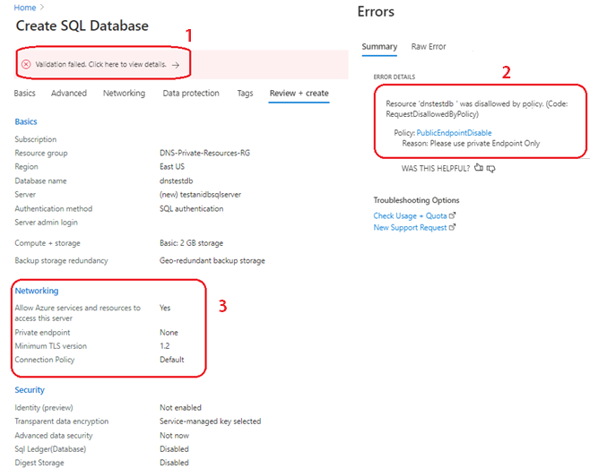
Figure 3
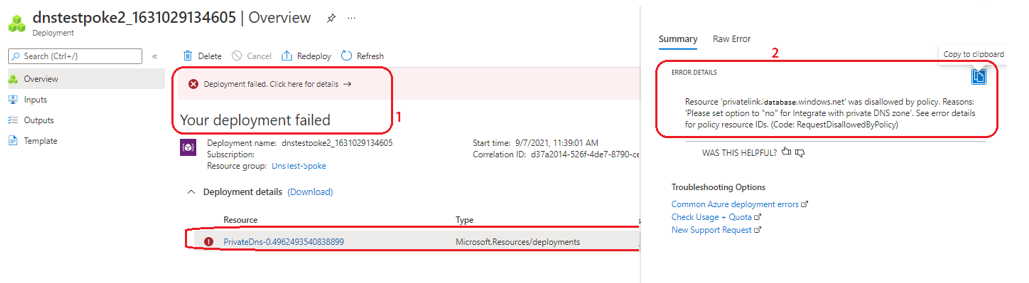 To avoid the deployment error, during resource creation, users must set the “Integrate with private DNS zone” to “No” (Figure 5).
Figure 5
To avoid the deployment error, during resource creation, users must set the “Integrate with private DNS zone” to “No” (Figure 5).
Figure 5
 If the user tries to create a private endpoint with Private link integration, then the policy will deny creation of the resource during validation as depicted in Figure 6, the Azure Portal resource creation screen when the “Integrate with DNS private zone?” setting is set to “Yes”.
1. Integrate with Private DNS Zone is set to “Yes”.
2. Error details reference the policy that denied creation of resource, and reason.
Figure 6
If the user tries to create a private endpoint with Private link integration, then the policy will deny creation of the resource during validation as depicted in Figure 6, the Azure Portal resource creation screen when the “Integrate with DNS private zone?” setting is set to “Yes”.
1. Integrate with Private DNS Zone is set to “Yes”.
2. Error details reference the policy that denied creation of resource, and reason.
Figure 6
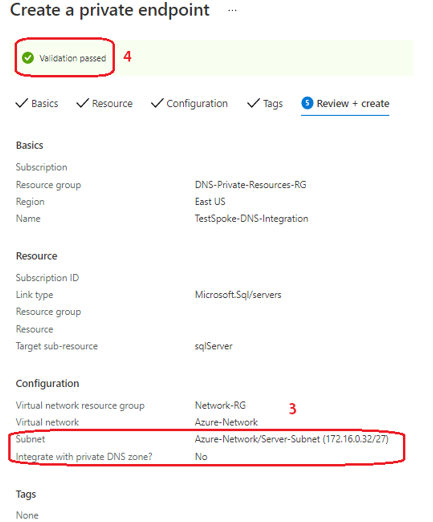
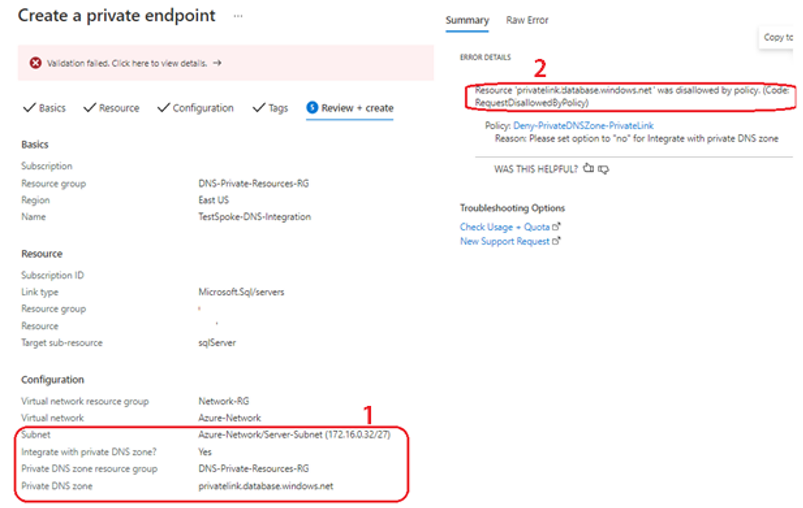 Figure 7 depicts the Azure Portal screen when the “Integrate with DNS private zone?” setting is set to “No”.
3. The setting is observed in the Networking configuration
4. Policy validation passes
Figure 7
Figure 7 depicts the Azure Portal screen when the “Integrate with DNS private zone?” setting is set to “No”.
3. The setting is observed in the Networking configuration
4. Policy validation passes
Figure 7