Blogs
Microsoft Fabric: Expert Guidance for a Successful Evaluation
“How can we use Azure Cloud to modernize our applications” is among top asks we hear at SNP from our customers. There are various motivations for the question, from an interest in re-hosting legacy applications running on on-premise servers to greenfield application development initiatives. The person posing the question knows that cloud technology has something to offer, but the territory is unexplored and mysterious.
In this blog, my aim is not to extol the virtues of Azure Web Apps, Functions, Azure managed Kubernetes or other service of the moment. Neither will I convey best practices to solve an application architecture problem with Azure technology. Rather, my intent for these tips is to help lower the veil, so to speak. Follow some or all, and you will find Azure approachable and ready to implement for your application innovation projects.
If you are new to Azure, Microsoft makes it super easy to set up a FREE Azure subscription. And, if you are a Visual Studio subscriber, don’t overlook your Azure benefits.
Once you have an Azure subscription, you’ll have access to the Azure Portal, the management portal for Microsoft Azure. Log in and you are prompted to take a guided tour. It’s short and worth the trip.

Next, I recommend a visit to the Quickstart Center. In the portal search box, start typing “quickstart” to expose the Quickstart Center link.
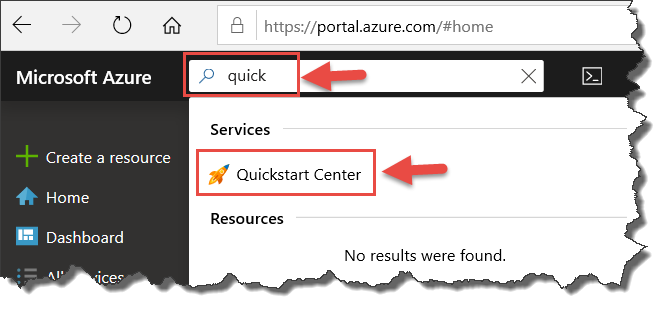
Follow the link and review the “Get started” screen. You’ll want to review the Setup guides, but if you are eager to play, dive right into the “Start a project” options. The options do not require an existing application project or database. For instance, select “Create a web app” and then “Create a CI/CD pipeline with Azure DevOps Projects.” With DevOps Project, in a few steps through its wizard UI you can:
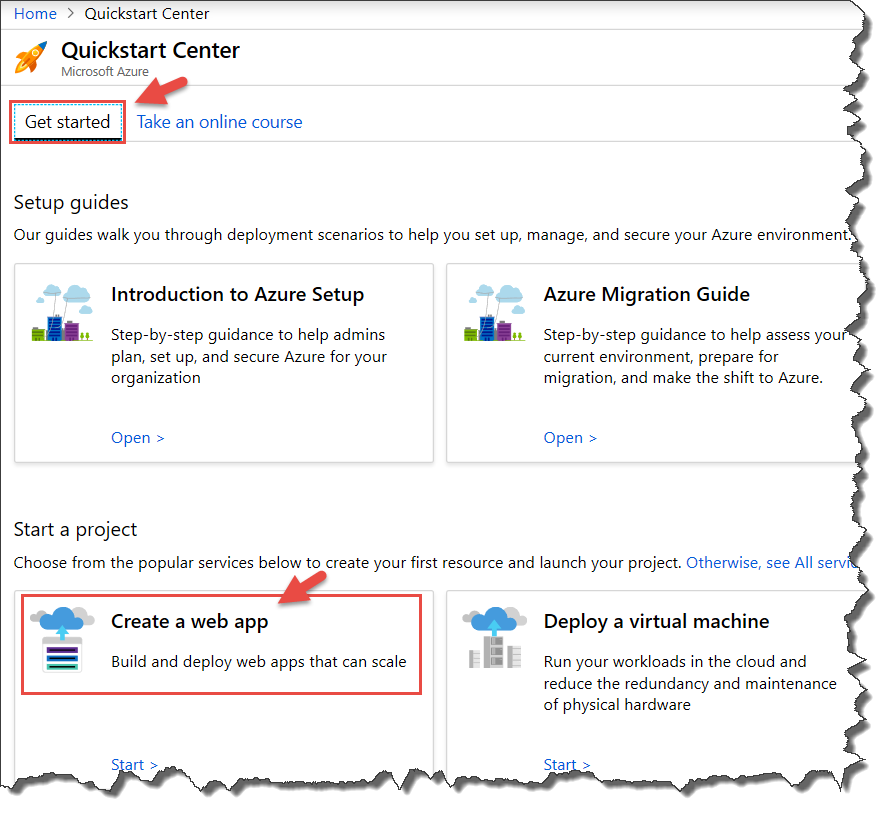
Note the “Take an online course” tab in the Quickstart Center. This is one of several venues for deeper Azure study. I mention other learning resources in the tips that follow.
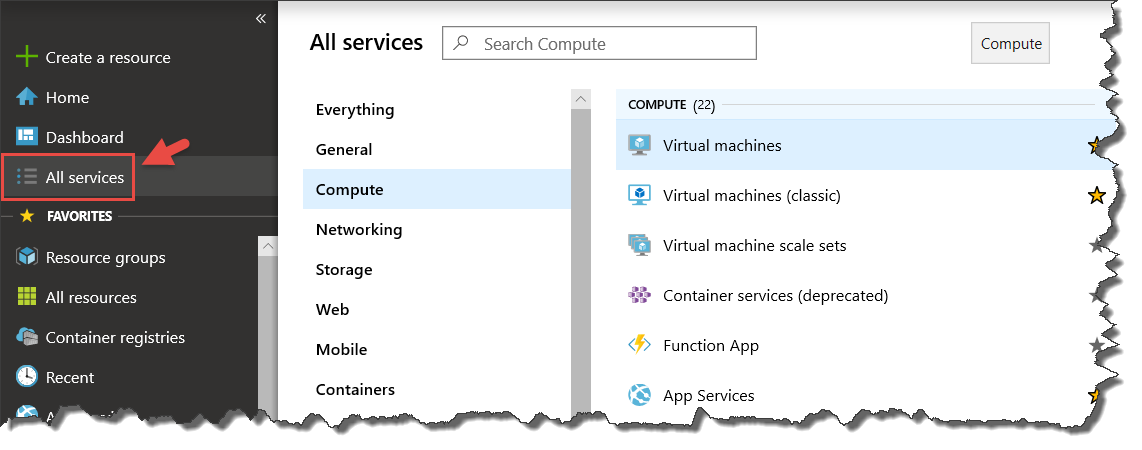
While in Azure Portal, my next suggestion to get a sense of the scope of Azure is to follow the All services link on the left menu. From here you can see over 100 Azure service types categorized by domains, such as Compute, Networking, Storage, Web, and so forth.
The groups that are the core of solutions in Azure for app innovation are Compute, Web, Containers, Integration, Internet of Things, Databases, and DevOps. Peer into these service types to get a high-level sense of what Azure has to offer.
I started our tips with the Azure subscription sandbox, but paramount to Azure app innovation is an understanding of the service tooling and how to apply it. Azure Architecture Center holds the key to learning how to get the most out of Azure.
From the navigation menu on the left and featured links on the home page, we know that this is our go-to reference for:
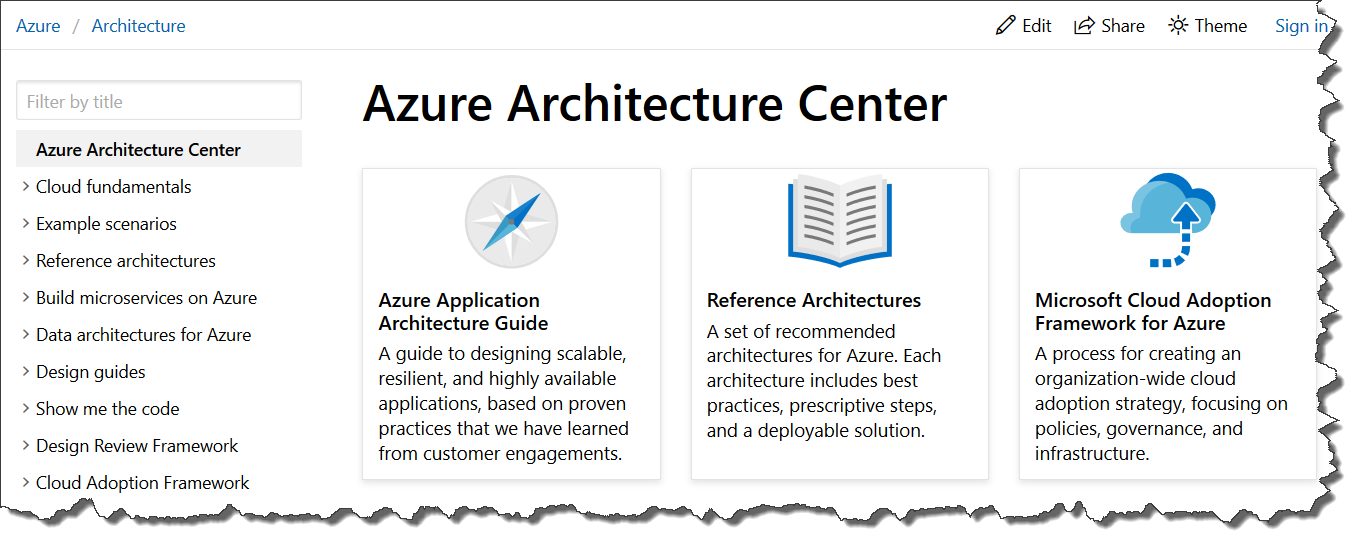
After the home page, an excellent place to start is the Azure Application Architecture Guide.
After gaining a foundational understanding of cloud computing and architectures, a primary concern of development teams is to review its digital estate and determine how to go about cloud adoption. There is an excellent set of articles for this, which begins with a favorite of mine The 5 Rs of rationalization.
I’ve saved the sales pitch for this, our third tip ☺
Customer Immersion Experience (CIE) is a program for Microsoft Partners, such as SNP, to deliver hands-on training to software delivery teams. SNP’s expert facilitators can conduct the workshop on-site or remotely. The format is a blend of PowerPoint driven lecture, instructor led demonstrations, whiteboard sessions and proctored hands-on-labs.
For an App Innovation CIE, SNP can deliver a 1/2 day to multi-day workshop tailored to the technologies you work with and the Azure resources that best correlate to your application workloads.
For example, consider the topics below that we cover in our “App Innovation with Azure” 2-day workshop. This workshop targets product owners, developers and system administrators that contribute to the application value stream.
App Innovation on Azure Cloud
Learn the benefits of cloud computing and how Azure services facilitate modernization of application workloads.Deploy a website to Azure with Azure App Service
Learn how to create a website through the hosted web app platform in Azure App Service. Use the publishing features of Visual Studio 2017 to deploy and manage an ASP.NET Core web application hosted on Azure.DevOps for Azure Applications
An overview of DevOps practices and their benefits, followed by a guided tour of Azure DevOps, Microsoft’s suite of tools to plan smarter, collaborate better, and ship faster.Containers on Azure
A synopsis of the benefits of containers for application packaging, and a survey of the options in Azure for container management and deployment.Azure Dev Spaces
A demonstration of Microsoft’s utility to test and iteratively develop your entire microservices application running in Azure Kubernetes Service (AKS) without the need to replicate or mock dependencies.
While the structured delivery of training via the CIE model is quite beneficial, Microsoft provides hands-on-labs that can be done at your own pace. The primary resources for app innovation labs are:
Put an “Azure Immersion Monday” on your calendar, where you block out an hour or two for a lab a couple times a month.


| Title | Format | Consume in... | When |
|---|---|---|---|
| Azure Podcast | Podcast | 30 mins | Tuesday commute |
| Azure DevOps Podcast | Podcast | 45 mins | Wednesday commute |
| Azure Friday | Video | 15 mins | Monday morning |
| Azure Source blog | Blog | 30 mins | Wednesday morning |